Remote learning in the periphery: a chance to make knowledge accessible without borders
A digital course built for phones‚ weak connections and changing hours‚ with recorded and live content‚ makes remote learning accessible in the periphery.
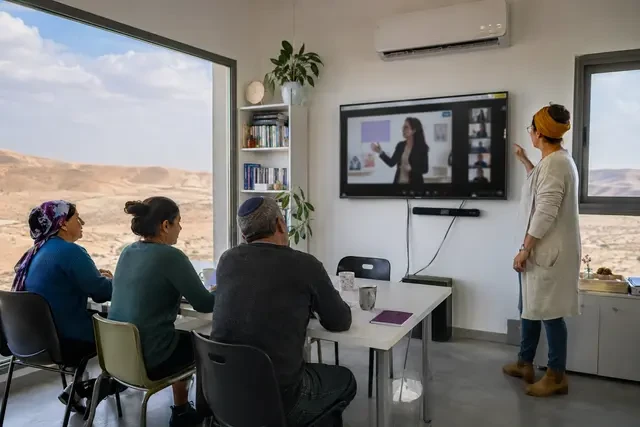
For this opportunity to become real‚ the course has to be designed around the participants' living conditions‚ not just by moving a lesson onto a video call. A guide to building a digital course should deal with the device people will learn on‚ the quality of their connection and the option to pause and download materials as early as the structure stage. When these questions come in early‚ technology reduces distance instead of creating a new entry test. The implications go beyond choosing a format. Planning for a phone‚ an unstable connection and changing hours also affects the length of units‚ the type of practice and the way support is given. From here it is possible to build a track that connects technical accessibility‚ flexibility and human contact‚ so that learners do not have to choose between where they live and the chance to grow.
Barriers Beyond Geographic Distance
Gaps exist even within the same community. One home has a personal computer and a quiet room‚ while another family shares one device and one connection. Others depend on a phone or can study only at hours when the house calms down. Before building the track‚ it is worth talking with representatives of the audience and finding out under what conditions they will actually use the content. The check does not need to be complicated. A few questions about devices‚ reception‚ free hours and previous experience can change the plan. This information is more reliable than the assumption that "everyone has internet". Having a connection does not guarantee that someone can watch an hour of video or join a live broadcast every evening.
Designing for Mobile from the Start
When the phone is the main device‚ the track should be tested on it from day one. Text must be readable‚ buttons clear and files easy to open. A form that does not work on a small screen or a presentation that needs constant zooming turns a simple action into a struggle and raises the chance of dropping out. Downloading materials can matter too. An audio file‚ a transcript or a summary document let learners make use of times when reception is good and continue later without a steady connection. Not all content has to be available in every format‚ but the essential parts should be accessible in more than one way.
The Right Mix of Recorded and Live
A live session creates presence and connection‚ but it also brings back the constraint of a fixed time. Recorded content allows flexibility but can feel lonely. Combining them can work well: short units taken at a convenient time‚ alongside focused sessions for questions‚ practice or professional discussion. It is worth recording the session and offering an alternative way to take part. Someone who cannot attend should not lose an essential part of the track. At the same time‚ the live session should not repeat the whole lesson; it should use the shared time for what is hard to do alone.
A Flexible Pace with Anchor Points
Without travel there is more freedom‚ but also more room to put things off. A recommended schedule‚ a weekly goal and progress tracking help turn flexibility into a framework. Learners can be allowed to fall behind and come back without being embarrassed. The aim is to keep direction‚ not to copy classroom discipline onto a screen. A good reminder suggests one small action: watch one unit‚ download a file or answer a question. Too many messages create noise‚ especially for people juggling work and family. Contact should be consistent‚ to the point and tied to the value that made the participant start learning.
Practice Linked to the Local Environment
Making knowledge accessible is not only about watching an expert from afar. Learners need to use the knowledge where they live and work. A task might ask them to examine a case from their community‚ interview a local professional or apply a tool in an existing business. That way the content does not stay imported and abstract but meets a familiar reality. The local connection also lets knowledge travel in the opposite direction. Participants from the periphery bring examples‚ methods and needs that are not visible from the center of the country. When the course gives them room to share and analyze‚ it does not just make existing knowledge accessible but expands the knowledge of the whole group.
Human Support Within Reach
A small technical glitch can look like a major barrier when there is no one to turn to. There should be a clear help channel‚ response hours and a short explanation of how to solve common problems. Sometimes a phone call or a voice message is more accessible than a support form. The choice should suit the audience's habits‚ not just the system's convenience. Learning support matters as well. A mentor‚ a peer group or a regular meeting can help learners interpret a task and get back on pace. Support does not have to be available at every moment‚ but it should be predictable. Knowing that someone will answer reduces the sense of isolation and encourages people to try before giving up.
From Learning to a Real Opportunity
An accessible course is not enough if there is no bridge to using the knowledge. It is worth linking the track to a project‚ a portfolio‚ hands-on experience‚ further studies or relevant employers. From the very start‚ participants should understand not only what they will learn but which door may open if they persevere and do the work. This connection is especially important when the local market is small. Remote work‚ serving clients from other regions and partnerships can widen the options. They should be presented realistically‚ without promises of employment that are beyond the course's control‚ along with tools that bring learners closer to the next step.
Measuring Accessibility Through Participation
The number of sign-ups does not prove that a track is accessible. It is worth checking who started‚ who came back‚ where people stopped and which devices they used. Short conversations with those who did not continue can reveal a heavy file‚ an unsuitable time or an instruction that was not clear. This information makes it possible to fix a barrier instead of blaming motivation. Measurement should include outcomes too. Did participants complete a task‚ use the knowledge or move on to another opportunity? Combining usage data with personal stories gives a full picture. Sometimes a small change in support or format has more impact than adding a new lesson. So that learning does not remain a one-off event‚ you can send a short review task or an invitation to share an application some time later. This later contact is a reminder that the course was meant to be used‚ and it gives the creators information about what remains once the first enthusiasm has passed. It also helps identify participants who need a small push‚ not a new track.
In Summary
Remote learning can reduce the effect of distance‚ but only when it is designed around learners' lives‚ devices and infrastructure. Mobile-friendly design‚ lightweight materials‚ a balanced mix of recorded and live content and a pace with anchor points turn technical access into real participation. When local practice‚ support and a bridge to opportunity are added‚ knowledge moves in both directions: it reaches the periphery and allows the experience found there to reach a wider audience.